


Davis WeatherLink Cloud Platform
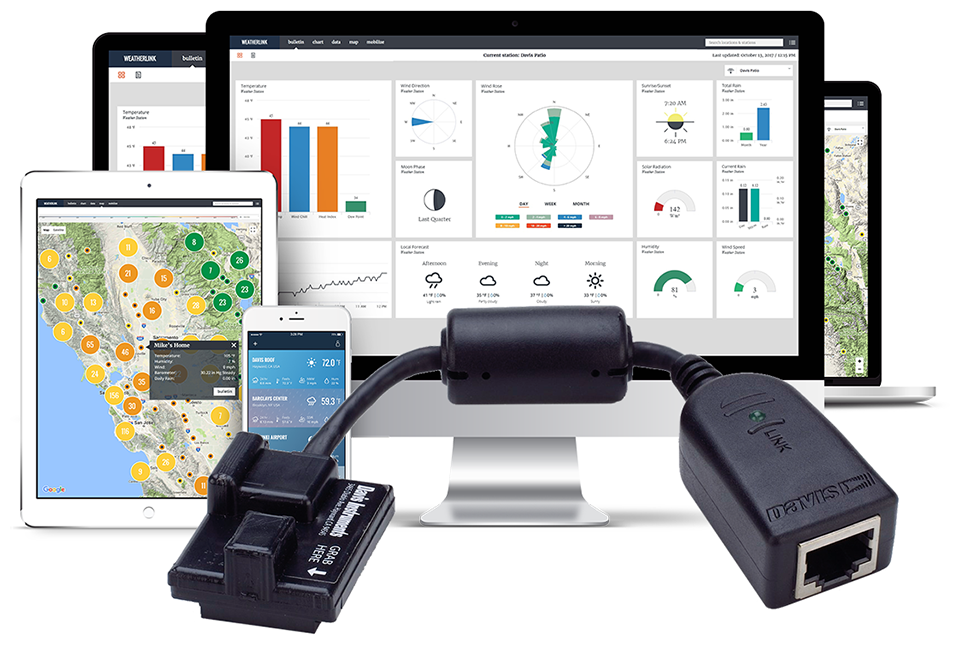
Access real-time data anytime, anywhere
WEATHERLINK.COM 2.0
View, Share and Compare All Your Weather Data on the Web or Mobile App
Bulletin
Build and customise your WeatherLink bulletin dashboard to receive current data updates from all of your installed sensors. You can move and resize tiles to see the data just the way you like it.
New Features: Wind Rose, Local Forecast, Sunrise/Sunset, Moon Phase
Key Features: Solar Radiation, Temperature, Humidity, Barometer, Wind Speed, Current Rain, Wind Direction, Total Rain
Chart
Visualise any of your sensor data with custom line and bar charts on up to 4 different y-axes. Zoom into an hour of data or out to a full year to view details and trends (requires Pro or Pro+ subscription).

WeatherLink Chart in web browser
Data
Access all of your raw sensor data at the click of a button. You can sort by date/time or data type and export any data set directly to an Excel-friendly .csv file (requires Pro or Pro+ subscription).

WeatherLink Data in web browser
Map
Use the WeatherLink Map to view and interact with the community of public stations in the worldwide WeatherLink Network. Click on a station to see a summary of current data and click the bulletin to see the station’s customised weather dashboard.

WeatherLink Map in web browser
Mobilize
Use the Davis Mobilize App on iOS or Android to create custom frost, weather, crop and irrigation views for web and mobile. It’s powerful enough to help avoid losing your farm crop to frost, and fun for the data-savvy backyard gardener looking to perfect their tomato crop (requires Pro or Pro+ subscription).
Features:
- Frost
- Weather
- Crop
- Irrigation: Soil Water Content
- Irrigation: Total Soil Water Content

WeatherLink Mobilize in web browser
WeatherLink Mobile App Insights

Access premium graphical updates, sensor integrations, and localized performance directly from your handheld device.
How Do I Push my Data to the WeatherLink Cloud?
It’s easy, get connected in a few simple steps.


WeatherLink Live™
WeatherLink Live can connect 80+ sensors and live-stream data over Wi-Fi or Ethernet directly to WeatherLink.com.

WeatherLink® Standard Data Logger
USB Version (Windows Software Included)
Serial Version (Windows Software Included)
USB and serial data loggers connect the console or Weather Envoy to a computer running WeatherLink Computer Software. You can also upload data to WeatherLink Cloud with an internet-connected computer that is on and running the software 24/7.

Vantage Connect®. Cellular Matrix
Vantage Connect combines cellular technology with an integrated data logger to transmit real-time sensor data to the WeatherLink Cloud from remote locations. This unit is self-contained, weather-resistant, and powered by a 5-watt solar panel with a back-up battery.
Allows you to retrieve weather data from any remote site that has cellular coverage.
Features Comparison Grid
| Features | WeatherLink Live | USB Data Logger | Serial Data Logger | Vantage Connect |
|---|---|---|---|---|
| Product No. | DI-6100 | DI-6510USB | 6510SER | DI-6622SOV |
| Communication technology | Internet | Internet | Internet | Cellular (2G or 3G) |
| Automatic data upload to WeatherLink Cloud | Yes | No | No | Yes |
| Requires PC running 24/7 to upload | No | Required | Required | No |
| Free Basic Tier Page access | Yes | Yes | Yes | Yes |
| Pro Tier included in Annual Service Plan | No | No | No | Yes |
| Free Mobile App compatibility | Yes | Yes | Yes | Yes |
| Free Computer Software included | N/A | Windows | Windows | Windows |
| Learn More | Learn More | Learn More | Learn More |